
DB FPX 8400 Assessment 3 Scavenger Hunt Template
Student Name
Capella University
DB-FPX8400 Your DBA Journey
Professor Name
Date
Scavenger Hunt Template
Name: Belinda May
Quarter you are taking the course (i.e., Summer Quarter 2023). Spring Quarter 2025
Your instructor’s name: Dr.Diane Caron
Scavenger Hunt Components
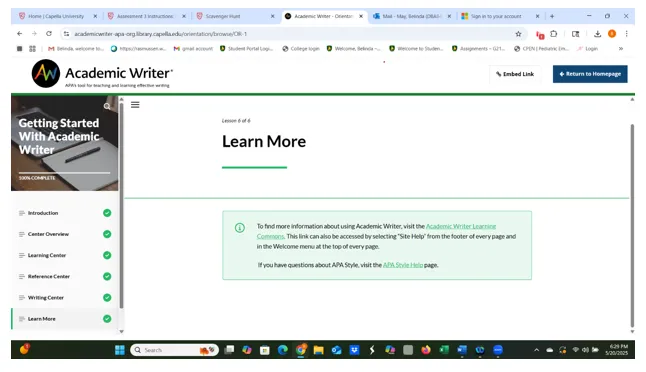
Academic Writer
Submit your screenshot showing the completion of the Getting Started with Academic Writer orientation:
Zoom
Submit Link to your Zoom Introduction here (Be sure to include a password if needed):
Belinda May is inviting you to a scheduled Zoom meeting.
Topic: Belinda May’s Personal Meeting Room
Join Zoom Meeting
https://zoom.us/j/7225734318?pwd=GqisVAjX5a416yKyr4ohlvVMrjOrGH.1
Meeting ID: 722 573 4318
Passcode: RG7R2Q
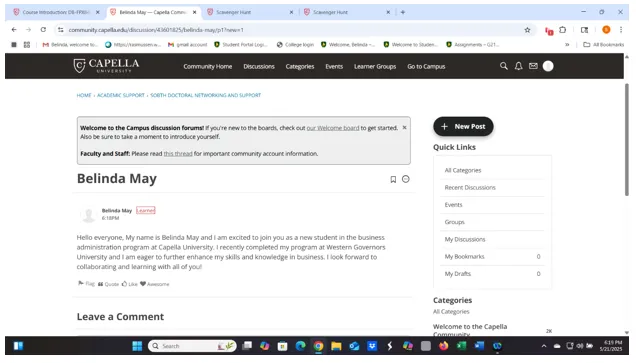
Campus: SOBTH Doctoral Networking and Support
Submit screenshot of your introduction posted in the SOBTH Doctoral Networking and Support discussion here:
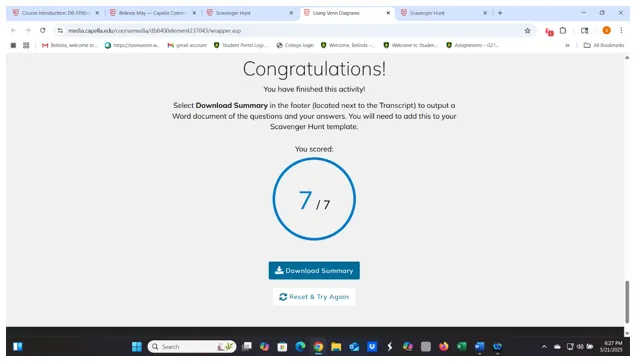
Venn Diagram
Annotated Bibliographies
Library Database Use Recording
Belinda May is inviting you to a scheduled Zoom meeting.
Topic: Belinda May’s Personal Meeting Room
Join Zoom Meeting
https://zoom.us/j/7225734318?pwd=GqisVAjX5a416yKyr4ohlvVMrjOrGH.1
Meeting ID: 722 573 4318
Passcode: RG7R2Q
DBA Capstone Professional Project Resources
The two acceptable project techniques allowed for a capstone project are:
- Generic qualitative inquiry
- Quantitative
Writing Center
Introductory Paragraphs
Literature Matrix
Business Problems
DBA Capstone Template
Skills Lab
Reflections
5-1 May – Belinda, what you have provided here is a link to the articles rather than a Word document with your written annotated bibliography for the two articles. If you look under the Resources tab at the top of Assessment #3, you will see a link for annotated bibliographies. This may help with how to write an annotated bibliography. You might also look at Google to see additional information about annotated bibliographies. The link that you want to include here should take me to your ePortfolio where you have saved your annotated bibliography.
7-1 May – Belinda, the following link with details under the Acceptable Project Techniques will provide you with the information you are being asked for here. If you follow the link here and scroll down to Acceptable Project Techniques, the two acceptable project techniques and related information will be listed there for you.
https://assets.capella.edu/campus/doctoral-programs/DBA-programs-research.pdf
8-1 May – Belinda, you are being asked to watch or attend a webinar in the Writing Center rather than including a screenshot of one of the sites within the Writing Center. From the Interactive Skills Lab instructions:
For this activity, you can either attend one of the upcoming Writing Webinars, which you can find in the Writing Support area, or you can view the recording of a prior webinar of your choice.
Paste a screenshot of you attending the webinar or a screenshot of the recorded webinar. Post the screenshot of the webinar you attended into a MS Word document and write a paragraph discussing the main points of what you learned from the live or recorded session. Upload your document to your OneDrive ePortfolio and add the link to the document to the Scavenger Hunt template.
9-1 May – Belinda, when I click on the link you have under this section, this is what I get:
“Placeholder for login error page.
Your attempt to access a page on this server did not result in a valid login header or you attempted to access the login redirect without a return path.”
For this activity, you are being asked to complete the Interactive Learning Module (Activity 2) in Assessment #1 and write your practice answers as part of the activity. When you finish, you will have the opportunity to download the entire 7-page document that includes the activity along with all of your practice responses. This 7-page document is what you want to save to your ePortfolio and then include the link here in the template for that.
If you go to Assessment #1 and click on Activity 2 in the bar across the top of the page, you will see the activity you are being asked to complete. It is called Writing Introductory Paragraphs.
Please work with tech support for additional support for your links.
11-1 May – Belinda, I do not see a link here for this element of the Scavenger Hunt. I am seeing that you continue to add links to your Capstone template in all of these sections, and I am confused as to why this link is included in every section toward the end of your paper.
To complete the Business Problems piece of the Scavenger Hunt (which is #11 on the Scavenger Hunt template media), go to the DBA Skills Lab:
https://capellauniversity0.sharepoint.com/sites/DBASkillsLab
Select Module 9: Creating a Problem Statement: here is the direct link to Module 9:
https://capellauniversity0.sharepoint.com/sites/DBASkillsLab/SitePages/Module-9.aspx
NOTE: You must sign in using your capellauniversity.edu email account and password. The Skills Lab SharePoint site will not recognize you if you use a different email account.
Once you complete the Post-Test, you will see the option to “Print or get PDF of Answers.” Click this option, print the results to a pdf and save. The PDF will be your certificate of completion. Upload the PDF certificate of completion to your OneDrive ePortfolio. Now, copy and paste the OneDrive link to the PDF certificate of completion for Skills Lab Module 9: Creating a Problem Statement to the Scavenger Hunt Template under Business Problems.
12-1 May – Belinda, I am including instructions for this element of the Scavenger Hunt. This information is also posted in the Announcements section of the course room.
The template should be 27 pages long.
The following link is for the Capstone template:
There are three revisions that you are being asked to make in order to have your template ready for your next courses.
On the title page, add your name and my name (Dr. Dianne Caron) While this does not impact your grade at all, you have my name listed as Dr. Diane Cousert- Term 1
On page iv, there are four options listed. Please delete three of those options, leaving only the one option that applies to you.
On page 1 under Course 1. First Course, you will be including a link to Assessment #1 once it is completed. In the meantime, please include a link to your ePortfolio to show that you understand where you will be including links to completed assessments as you move through the program. You can replace this link with the link to Assessment #1 once it is completed. This will be the template you use throughout your program, and you will continue to add content from each course you take.
13-1 May – Belinda, you have included another link to your Capstone template here. These are the detailed instructions that you want to follow for this part of the Assessment. This is also posted in the announcements section of the classroom.
What you want here is a link to your ePortfolio, where you have set up a Skills Lab folder. When I click on the Skills Lab folder, I should see a folder titled Certificates of Completion. In that folder, you want to place your activity completion or post-test for the “Using OneDrive and ePortfolio” skills lab activity. You completed and included the business Problem activity (which is good), but not the required Using OneDrive activity. Once you complete the correct activity, you want to include a link to your Skills Lab folder in your ePortfolio with a certificate of completion folder where you have placed this post-test screenshot. You want to save that post-test screenshot to your ePortfolio-Skills Lab – Certificates of Completion folder and provide that link here. It is important that you set up this folder structure, as you will continue to add post-test certificates of completion for additional activities in future courses. This information is also posted in the Announcements section as well.
From the Skills Lab:
Complete the “Using OneDrive and ePortfolio” skills lab. Create a “Skills Lab” folder in your OneDrive ePortfolio. Upload a copy or a screenshot image of your completed Post-Test to your Skills Lab folder in OneDrive. You can easily save a pdf copy of their post-test results (often called certificates of completion) to your OneDrive. Be sure to add the link to this folder to the Skills Lab Certificates section of your DBA Capstone Template and in your Scavenger Hunt Template.
14-1 May – Demonstrated. Belinda, thank you for sharing your in-depth takeaways from the Scavenger Hunt Assessment. I am glad that you found it helpful. The hope with this assessment is that students will be able to locate and use some of the many resources that Capella has available to support them on this journey.
I appreciate you sharing your suggestion for improving this Assessment. Faculty are not able to make revisions to course Assessments, but I always share student feedback (anonymously) with the team that looks at revising content. I appreciate you taking the time to share your suggestion with me.
I am not sure if you saw this link in the Assessment instructions, but there are additional detailed instructions in this section that you may find helpful.
https://media.capella.edu/coursemedia/db8400element237040/
wrapper.asp?sso=true
Struggling with DB FPX 8400 Assessment 3 Scavenger Hunt Template? Get professional help and achieve A+ results effortlessly!
Related Free Assessment for DB-FPX8400
DB FPX 8400 Assessment 2 Professional Development Framework